
Categories
Coupons are said to have been around since the 1800s (the first one issued by Coca-Cola) and for years savvy shoppers have been clipping coupons, and later on, printing them off the web – but today, it's more about apps, codes and cashback.
This is our regularly updated list of the top grocery coupons, cashback and deals. Popular offers include:
47 current deals
Food coupons
Via cashback. Get from Tesco (mostly in England, plus some stores in Wales)
If you buy a 450g pack of Freee Swiss style muesli at participating Tesco stores (250+ in England and 20 in Wales – see the full map), you can get up to £3.30 back, paid into a PayPal or bank account – make sure you keep your itemised receipt. This freebie is being promoted by Doves Farm Foods via marketing platform Hashting.
When we checked, it was £3.30 at Tesco, making the item free after cashback. You'll only get back the amount you paid, up to £3.30.
To claim, go online to Hashting (it's best viewed on a mobile), and select 'Claim a free Swiss style muesli'. You'll be sent another link (valid for seven days) to claim via WhatsApp, or if you'd prefer, sent via text message – so you'll have to give your mobile number if you don't use WhatsApp. After you've bought the product, you'll need to take a photo of your receipt and upload it as proof of purchase.

This offer will end at 11.59pm on Sunday 1 November or when 1,500 redemptions have been made (the promotion launched on 12 October). Each household can apply for cashback once. Hashting says you should receive your cashback within 30 working days – see full terms and conditions.
Check out more freebies available now.

Via cashback. Get from Asda, Sainsbury's, Morrisons, Tesco, Co-op, Waitrose or Ocado
If you buy a 280g pack of Tofoo & Co Naked Tofu at Asda, Sainsbury's, Morrisons, Tesco, Co-op, Waitrose or Ocado, you can get up to £2.30 back, paid into a PayPal or bank account via marketing platform Hashting.
When we checked, a 280g pack cost £1.70 at Ocado, £1.77 at Asda and £2.30 at Sainsbury's, making it completely free.
It cost £2.40 at Waitrose, £2.50 at Morrisons and Tesco, and £2.70 at Co-op, so the cashback makes the item 10p to 40p if bought from those stores. You'll only get what you paid, up to £2.30.
To claim, go online to Hashting (it's best viewed on a mobile), and you'll be sent another link to claim via WhatsApp, or if you'd prefer, sent via text message – so you'll have to give your mobile number if you don't use WhatsApp.
Within seven days, you'll need to buy the product, and then take a photo of your receipt and upload it as proof of purchase.
This offer will end at 11.59pm on Saturday 31 October or when 30,000 redemptions have been made. Each household can apply for cashback once. See Hashting FAQs.

Hashting says you should receive your cashback within 30 days – see full terms and conditions (PDF).
Makes it £3.66. At Sainsbury's for Nectar members
Roast dinner season is in full swing, and Sainsbury's has a cracking deal on its 1.6kg British fresh medium whole chicken. It's £3.66 with a Nectar card (free to join) until Tuesday 27 October. This is a 33% reduction on the £5.50 non-Nectar price.
Sainsbury's says its large enough to serve eight people, working out at 46p per person. The next cheapest we could find for a similar sized chicken was £5.95 at Waitrose.
See our supermarket coupons round-up for more ways to save on the weekly shop.

Cashback via app. Valid from Morrisons, B&M & Iceland
Product: Homepride Fajita pasta bake sauce 485g
Buy from: Morrisons, B&M or Iceland (normally £2.65)
Cashback: £1.15, or an amount making the product £1.50 – upload a photo of your receipt via the Shopmium app and scan the product barcode
End date: 11.59pm on Sunday 8 November (subject to change, so check link above)
You won't receive your cashback immediately – you can only request it once you've accumulated £10 in cashback via Shopmium, so bear in mind it could take a while to get the saving back, as you'll need to earn cashback on multiple items before you can withdraw it.
More info
How to get the cashback
-
Buy the correct product. Check the product to be sure you get the right item (be extra sure you've got the right size). With Shopmium, if you're shopping in-store you can even use the app to scan the barcode to be sure you've got the right one.
-
Get and keep your receipt. Make sure you get a printed receipt in store, or with your delivery/click and collect order if you shop online. You'll need this for your cashback.
-
Take a photo of your receipt and upload. To get the cashback, you need to photograph the receipt and upload it in the app to get the money back. You'll also be able to use a photo of your online order if you shopped online.
-
Keep the packaging with barcode. You'll also need to scan the barcode when you upload to be sure you've bought the right size/flavour of product.
-
Request your cashback once you've reached Shopmium's £10 withdrawal threshold. You need to physically request your cashback once you've accumulated at least £10 within the Shopmium app. Your cashback will be paid into your PayPal or bank account, whichever you choose, within approximately 3-5 working days.
Cashback via app. Valid from Tesco, Asda, Morrisons, B&M & Iceland
Product: Homepride Marry Me Chicken pasta bake sauce 485g
Buy from: Tesco, Asda, Morrisons, B&M or Iceland (normally £2.65)
Cashback: £1.15, or an amount making the product £1.50 – upload a photo of your receipt via the Shopmium app and scan the product barcode
End date: 11.59pm on Sunday 8 November (subject to change, so check link above)
You won't receive your cashback immediately – you can only request it once you've accumulated £10 in cashback via Shopmium, so bear in mind it could take a while to get the saving back, as you'll need to earn cashback on multiple items before you can withdraw it.
More info
How to get the cashback
-
Buy the correct product. Check the product to be sure you get the right item (be extra sure you've got the right size). With Shopmium, if you're shopping in-store you can even use the app to scan the barcode to be sure you've got the right one.
-
Get and keep your receipt. Make sure you get a printed receipt in store, or with your delivery/click and collect order if you shop online. You'll need this for your cashback.
-
Take a photo of your receipt and upload. To get the cashback, you need to photograph the receipt and upload it in the app to get the money back. You'll also be able to use a photo of your online order if you shopped online.
-
Keep the packaging with barcode. You'll also need to scan the barcode when you upload to be sure you've bought the right size/flavour of product.
-
Request your cashback once you've reached Shopmium's £10 withdrawal threshold. You need to physically request your cashback once you've accumulated at least £10 within the Shopmium app. Your cashback will be paid into your PayPal or bank account, whichever you choose, within approximately 3-5 working days.

Magazine coupon for Tesco only, valid in-store or online
Pick up the October edition of the free magazine from Tesco (find your nearest*) to get a coupon for £1.10 off any Activia product* valid in-store, or online using the code GRP7HT at Tesco until Tuesday 3 November. When we checked, packs ranged from £1.75 to £4.25.
Magazine coupon for Tesco only, valid in-store or online
Pick up the October edition of the free magazine from Tesco (find your nearest*) to get a coupon for £1 off any Biotiful Gut Health Kefir drink or yogurt* valid in-store, or online using the code GRH7TP at Tesco until Tuesday 3 November. When we checked, packs ranged from £1.85 to £4.50.

Magazine coupon for Tesco only, valid in-store or online
Pick up the October edition of the free magazine from Tesco (find your nearest*) to get a coupon for £1 off a 200g pack of Better Nature Organic Tempeh* valid in-store, or online using the code GRF7PT at Tesco until Tuesday 3 November. When we checked, a packet cost £2.75.

Via cashback app. Valid from Morrisons & Co-op
Product: Maggi Korean spicy gochujang beef noodles 130g
Buy from: Morrisons or Co-op (normally £1.50)
Cashback: £1, or an amount making the product 50p – upload a photo of your receipt via the Shopmium app and scan the product barcode
End date: 11.59pm on Tuesday 10 November (subject to change, so check link above)
You won't receive your cashback immediately – you can only request it once you've accumulated £10 in cashback via Shopmium, so bear in mind it could take a while to get the saving back, as you'll need to earn cashback on multiple items before you can withdraw it.
More info
How to get the cashback
-
Buy the correct product. Check the product to be sure you get the right item (be extra sure you've got the right size). With Shopmium, if you're shopping in-store you can even use the app to scan the barcode to be sure you've got the right one.
-
Get and keep your receipt. Make sure you get a printed receipt in store, or with your delivery/click and collect order if you shop online. You'll need this for your cashback.
-
Take a photo of your receipt and upload. To get the cashback, you need to photograph the receipt and upload it in the app to get the money back. You'll also be able to use a photo of your online order if you shopped online.
-
Keep the packaging with barcode. You'll also need to scan the barcode when you upload to be sure you've bought the right size/flavour of product.
-
Request your cashback once you've reached Shopmium's £10 withdrawal threshold. You need to physically request your cashback once you've accumulated at least £10 within the Shopmium app. Your cashback will be paid into your PayPal or bank account, whichever you choose, within approximately 3-5 working days.
Via cashback app. Valid from Morrisons only
Product: Maggi Korean spicy kimchi chicken noodles 130g
Buy from: Morrisons (normally £1.50)
Cashback: £1, or an amount making the product 50p – upload a photo of your receipt via the Shopmium app and scan the product barcode
End date: 11.59pm on Tuesday 10 November (subject to change, so check link above)
You won't receive your cashback immediately – you can only request it once you've accumulated £10 in cashback via Shopmium, so bear in mind it could take a while to get the saving back, as you'll need to earn cashback on multiple items before you can withdraw it.
More info
How to get the cashback
-
Buy the correct product. Check the product to be sure you get the right item (be extra sure you've got the right size). With Shopmium, if you're shopping in-store you can even use the app to scan the barcode to be sure you've got the right one.
-
Get and keep your receipt. Make sure you get a printed receipt in store, or with your delivery/click and collect order if you shop online. You'll need this for your cashback.
-
Take a photo of your receipt and upload. To get the cashback, you need to photograph the receipt and upload it in the app to get the money back. You'll also be able to use a photo of your online order if you shopped online.
-
Keep the packaging with barcode. You'll also need to scan the barcode when you upload to be sure you've bought the right size/flavour of product.
-
Request your cashback once you've reached Shopmium's £10 withdrawal threshold. You need to physically request your cashback once you've accumulated at least £10 within the Shopmium app. Your cashback will be paid into your PayPal or bank account, whichever you choose, within approximately 3-5 working days.
Via cashback app. Valid from Morrisons only
Product: Maggi Korean spicy creamy cheese noodles 130g
Buy from: Morrisons (normally £1.50)
Cashback: £1, or an amount making the product 50p – upload a photo of your receipt via the Shopmium app and scan the product barcode
End date: 11.59pm on Tuesday 10 November (subject to change, so check link above)
You won't receive your cashback immediately – you can only request it once you've accumulated £10 in cashback via Shopmium, so bear in mind it could take a while to get the saving back, as you'll need to earn cashback on multiple items before you can withdraw it.
More info
How to get the cashback
-
Buy the correct product. Check the product to be sure you get the right item (be extra sure you've got the right size). With Shopmium, if you're shopping in-store you can even use the app to scan the barcode to be sure you've got the right one.
-
Get and keep your receipt. Make sure you get a printed receipt in store, or with your delivery/click and collect order if you shop online. You'll need this for your cashback.
-
Take a photo of your receipt and upload. To get the cashback, you need to photograph the receipt and upload it in the app to get the money back. You'll also be able to use a photo of your online order if you shopped online.
-
Keep the packaging with barcode. You'll also need to scan the barcode when you upload to be sure you've bought the right size/flavour of product.
-
Request your cashback once you've reached Shopmium's £10 withdrawal threshold. You need to physically request your cashback once you've accumulated at least £10 within the Shopmium app. Your cashback will be paid into your PayPal or bank account, whichever you choose, within approximately 3-5 working days.

Via Shopmium cashback app. Valid at Tesco, Sainsbury's, Asda, Morrisons, Waitrose & Co-op
Product: Onken Greek style natural set yogurt 450g
Buy from: Tesco, Sainsbury's, Asda, Morrisons, Waitrose or Co-op (normally £2.10)
Cashback: £1.10, or an amount making the product £1 – upload a photo of your receipt via the Shopmium app and scan the product barcode
End date: 11.59pm on Saturday 31 October (subject to change, so check link above)
You won't receive your cashback immediately – you can only request it once you've accumulated £10 in cashback via Shopmium, so bear in mind it could take a while to get the saving back, as you'll need to earn cashback on multiple items before you can withdraw it.
More info
How to get the cashback
-
Buy the correct product. Check the product to be sure you get the right item (be extra sure you've got the right size). With Shopmium, if you're shopping in-store you can even use the app to scan the barcode to be sure you've got the right one.
-
Get and keep your receipt. Make sure you get a printed receipt in store, or with your delivery/click and collect order if you shop online. You'll need this for your cashback.
-
Take a photo of your receipt and upload. To get the cashback, you need to photograph the receipt and upload it in the app to get the money back. You'll also be able to use a photo of your online order if you shopped online.
-
Keep the packaging with barcode. You'll also need to scan the barcode when you upload to be sure you've bought the right size/flavour of product
-
Request your cashback once you've reached Shopmium's £10 withdrawal threshold. You need to physically request your cashback once you've accumulated at least £10 within the Shopmium app. Your cashback will be paid into your PayPal or bank account, whichever you choose, within approximately 3-5 working days.
Drinks coupons

Via cashback. Get from Tesco, Sainsbury's, Morrisons, Asda, Waitrose or Ocado in England only
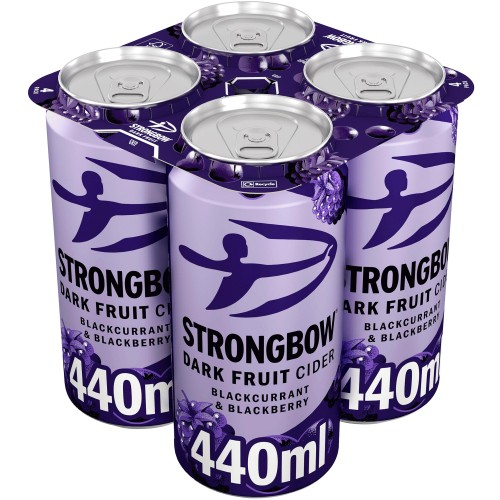
If you buy a four-pack of 440ml Strongbow Dark Fruit cider at Tesco, Sainsbury's, Morrisons, Asda, Waitrose or Ocado in England, you can get up to £7.50 back, paid into a PayPal or bank account – make sure you keep your itemised receipt. This freebie is being promoted by Heineken (owners of Strongbow) via marketing platform Hashting.
When we checked, a four-pack was £5.14 to £5.85 at most of the eligible supermarkets, making the item free after cashback. You'll only get back the amount you paid, up to £7.50.
To claim, go online to Hashting (it's best viewed on a mobile), and select 'Click here for your free 4 pack'. You'll be sent another link (valid for seven days) to claim via WhatsApp, or if you'd prefer, sent via text message – so you'll have to give your mobile number if you don't use WhatsApp. After you've bought the product, you'll need to take a photo of your receipt and upload it as proof of purchase.
This offer will end at 11.59pm on Sunday 1 November or when 10,000 redemptions have been made (the promotion launched on 2 October). Each household can apply for cashback once. Hashting says you should receive your cashback within 30 working days – see full terms and conditions.
Please be Drinkaware.
Check out more freebies available now.

Magazine coupon for Tesco only, valid in-store or online
Pick up the October edition of the free magazine from Tesco (find your nearest*) to get a coupon for £2 off any family pack of 14 Actimel Immune Support yogurt drink* or an eight-pack of its triple action. It's valid in-store or online using the code GRN4PR at Tesco until Tuesday 3 November. When we checked, packs ranged from £4.15 to £5.50.

Cashback via app. Valid from Asda only
Product: Coca-Cola Zero Sugar 2L (see eligible varieties below)
Buy from: Asda (normally £2.08)
Cashback: 50p – upload a photo of your receipt via the Shopmium app and scan the product barcode
End date: 11.59pm on Thursday 22 October (subject to change, so check link above)
Eligible varieties:
-
Coca-Cola Zero Sugar 2L
-
Coca-Cola Zero Sugar Cherry 2L
-
Coca-Cola Zero Sugar Cherry Float 2L
-
Coca-Cola Zero Sugar Zero Caffeine 2L
You won't receive your cashback immediately – you can only request it once you've accumulated £10 in cashback via Shopmium, so bear in mind it could take a while to get the saving back, as you'll need to earn cashback on multiple items before you can withdraw it.
More info
How to get the cashback
-
Buy the correct product. Check the product to be sure you get the right item (be extra sure you've got the right size). With Shopmium, if you're shopping in-store you can even use the app to scan the barcode to be sure you've got the right one.
-
Get and keep your receipt. Make sure you get a printed receipt in store, or with your delivery/click and collect order if you shop online. You'll need this for your cashback.
-
Take a photo of your receipt and upload. To get the cashback, you need to photograph the receipt and upload it in the app to get the money back. You'll also be able to use a photo of your online order if you shopped online.
-
Keep the packaging with barcode. You'll also need to scan the barcode when you upload to be sure you've bought the right size/flavour of product.
-
Request your cashback once you've reached Shopmium's £10 withdrawal threshold. You need to physically request your cashback once you've accumulated at least £10 within the Shopmium app. Your cashback will be paid into your PayPal or bank account, whichever you choose, within approximately 3-5 working days.

Cashback via app. Valid from Asda only
Product: Diet Coke 2L (see eligible varieties below)
Buy from: Asda (normally £2.08)
Cashback: 50p – upload a photo of your receipt via the Shopmium app and scan the product barcode
End date: 11.59pm on Thursday 22 October (subject to change, so check link above)
Eligible varieties:
-
Diet Coke 2L
-
Diet Coke Cherry 2L
-
Diet Coke Caffeine Free 2L
You won't receive your cashback immediately – you can only request it once you've accumulated £10 in cashback via Shopmium, so bear in mind it could take a while to get the saving back, as you'll need to earn cashback on multiple items before you can withdraw it.
More info
How to get the cashback
-
Buy the correct product. Check the product to be sure you get the right item (be extra sure you've got the right size). With Shopmium, if you're shopping in-store you can even use the app to scan the barcode to be sure you've got the right one.
-
Get and keep your receipt. Make sure you get a printed receipt in store, or with your delivery/click and collect order if you shop online. You'll need this for your cashback.
-
Take a photo of your receipt and upload. To get the cashback, you need to photograph the receipt and upload it in the app to get the money back. You'll also be able to use a photo of your online order if you shopped online.
-
Keep the packaging with barcode. You'll also need to scan the barcode when you upload to be sure you've bought the right size/flavour of product.
-
Request your cashback once you've reached Shopmium's £10 withdrawal threshold. You need to physically request your cashback once you've accumulated at least £10 within the Shopmium app. Your cashback will be paid into your PayPal or bank account, whichever you choose, within approximately 3-5 working days.
Baby coupons

Redeem online via Huggies
If you go online to Huggies, you can get a free sample pack of Huggies DryNites. There are multiple age categories available, with sizes ranging from 3 to 13 plus. Samples are limited to one per household.
We don't know how many nappies are in each sample pack, so it's hard to estimate its value. Packs normally cost betweem £3.50 and £6.50.
To get the freebie, you’ll need to enter your details online, including your child’s date of birth, your name, email address and your postal address. Samples are posted direct, so there’s no need to redeem in-store.
If you're looking for ways to budget for your baby, see our 40+ tips & tricks to save with a baby or toddler.
Get online coupon & redeem in-store at Co-op, Morrisons or Tesco
If you go online to Huggies, you can get a coupon for a free 48-pack of either pure, natural care or sensitive wet wipes. Pure and natural wipes are normally 95p, while sensitive wipes are normally £2.
The coupon can be redeemed in-store at a Tesco, Morrisons or Co-op, and is valid until Saturday 31 October.
To get the coupon, you’ll need to enter your details online, including your child’s date of birth or due date, to redeem the freebie. If you don’t want to share your child’s birthday, when we entered a made-up date of birth, we were still able to claim the coupon.
The coupon will be sent via email. You'll need to access the coupon on your phone (it doesn’t work on desktop devices). Once activated, you'll have 30 minutes to redeem the coupon, so only activate it when you’re ready to redeem.
If you're looking for ways to budget for your baby, see our 40+ tips & tricks to save with a baby or toddler.

Click & post coupon via Netmums. Collect in-store at Aldi
If you go via this Netmums link, you can get a voucher for a free full-size pack of 24 Mamia 'Newborn Premium Dry Fast' nappies (normally 85p) which you can redeem in-store at Aldi, while stock lasts.
The nappies come in a 'Size 1', which Aldi says fits babies weighing between 4-11lbs (2-5kg). Netmums says the coupon will be posted within two weeks.
If you're looking for ways to budget for your baby, see our tips and tricks to save with a baby or toddler.
More info
How to get this freebie
Simply fill out the Netmums online form with your name, address and email – Netmums says the voucher will be posted to you within two weeks.
It's one pack per person (but a parent and grandparent could each do it), and once you’ve received your voucher, show it at the checkout in any Aldi store (find your nearest). We can’t guarantee your local will have the nappies in stock so it’s best to do it as part of a bigger shop rather than making a special trip.
If you haven't received your voucher within two weeks, email producttrials@netmums.com. Netmums has confirmed your data is only shared with a third party fulfilment company so it can send your voucher, and won’t be used for any other purpose.
What is Netmums?
Netmums is an online community for parents. Its site includes a range of topics and content including recipes, product reviews, courses, a newsletter and a forum known as 'Coffee House', to share advice and get support from others going through the same experience.

Click & post coupons for baby food, plus other freebies
If you sign up to Ella's kitchen baby club, you could get coupons for free baby food, wallcharts and stickers.
If you're looking for ways to budget for your baby, see our 40+ tips and tricks to save with a baby or toddler.

Click & print coupons for nappies, plus other freebies
If you sign up to Pampers Squad, you could get coupons for money off nappies – we've previously seen £2 off coupons emailed to members – as well as the opportunity to test Pampers products for free.
If you're looking for ways to budget for your baby, see our 40+ tips and tricks to save with a baby or toddler.
Pet coupons

Claim online via Whiskas. One per household
If you go online to Whiskas, you can request a sample of its 'Chicken in Jelly' food for your feline. You've two options – a sample for kittens who are less than 12 months old, or a pouch for cats who are older than one.
To get this totally free sample, you’ll need to submit information such as your name, email address, your cat’s name and rough age, details about other cat food products you’ve bought in the last three months, and your address (so they know where to send the sample). Samples are limited to one per household, while stocks last.
While it’s hard to price the value of this sample, we reckon it’s worth about £1 based on the value of larger packs.
See our pet deals for more ways to save.

Via Shopmium cashback app. Valid from various retailers
Product: Cesar dry dog food (see eligible varieties below)
Buy from: Tesco, Sainsbury's, Asda, Morrisons, Waitrose, Pets at Home, Batleys or Booker Bet (normally £5.99)
Cashback: £3, or an amount making it 50% off – upload a photo of your receipt via the Shopmium app and scan the product barcode
End date: 11.59pm on Friday 29 October (subject to change, so check link above)
Eligible varieties (choose one only):
-
Cesar Adult Dry Dog Food with Fresh Beef, Poultry & Vegetables 1.4kg
-
Cesar Adult Dry Dog Food with Fresh Chicken, Salmon & Vegetables 1.4kg
-
Cesar Puppy Dry Dog Food with Fresh Chicken Rice & Vegetables 1.4Kg
You won't receive your cashback immediately – you can only request it once you've accumulated £10 in cashback via Shopmium, so bear in mind it could take a while to get the saving back, as you'll need to earn cashback on multiple items before you can withdraw it.
More info
Check the app before you buy to ensure you've been offered the deal, and don't buy unless it's something you'd use anyway. It's worth going quickly if it's something you want, as we've seen offers like this finish early.
How to get the cashback
-
Buy the correct product. Check the product to be sure you get the right item (be extra sure you've got the right size). With Shopmium, if you're shopping in-store you can even use the app to scan the barcode to be sure you've got the right one.
-
Get and keep your receipt. Make sure you get a printed receipt in store, or with your delivery/click and collect order if you shop online. You'll need this for your cashback.
-
Take a photo of your receipt and upload. To get the cashback, you need to photograph the receipt and upload it in the app to get the money back. You'll also be able to use a photo of your online order if you shopped online.
-
Keep the packaging with barcode. You'll also need to scan the barcode when you upload to be sure you've bought the right size/flavour of product
-
Request your cashback once you've reached Shopmium's £10 withdrawal threshold. You need to physically request your cashback once you've accumulated at least £10 within the Shopmium app. Your cashback will be paid into your PayPal or bank account, whichever you choose, within approximately 3-5 working days.
Cashback via app. Valid from Tesco, Sainsbury's, Asda, Morrisons & Pets at Home
Product: Pedigree Ranchos fillets with chicken 70g
Buy from: Tesco, Sainsbury's, Asda, Morrisons or Pets at Home (normally £2.50)
Cashback: £2, or an amount making the product 50p – upload a photo of your receipt via the Shopmium app and scan the product barcode
End date: 11.59pm on Wednesday 11 November (subject to change, so check link above)
You won't receive your cashback immediately – you can only request it once you've accumulated £10 in cashback via Shopmium, so bear in mind it could take a while to get the saving back, as you'll need to earn cashback on multiple items before you can withdraw it.
More info
How to get the cashback
-
Buy the correct product. Check the product to be sure you get the right item (be extra sure you've got the right size). With Shopmium, if you're shopping in-store you can even use the app to scan the barcode to be sure you've got the right one.
-
Get and keep your receipt. Make sure you get a printed receipt in store, or with your delivery/click and collect order if you shop online. You'll need this for your cashback.
-
Take a photo of your receipt and upload. To get the cashback, you need to photograph the receipt and upload it in the app to get the money back. You'll also be able to use a photo of your online order if you shopped online.
-
Keep the packaging with barcode. You'll also need to scan the barcode when you upload to be sure you've bought the right size/flavour of product.
-
Request your cashback once you've reached Shopmium's £10 withdrawal threshold. You need to physically request your cashback once you've accumulated at least £10 within the Shopmium app. Your cashback will be paid into your PayPal or bank account, whichever you choose, within approximately 3-5 working days.
Cashback via app. Valid from Tesco, Sainsbury's, Asda & Morrisons
Product: Pedigree Ranchos fillets with duck 70g
Buy from: Tesco, Sainsbury's, Asda or Morrisons (normally £2.50)
Cashback: £2, or an amount making the product 50p – upload a photo of your receipt via the Shopmium app and scan the product barcode
End date: 11.59pm on Wednesday 11 November (subject to change, so check link above)
You won't receive your cashback immediately – you can only request it once you've accumulated £10 in cashback via Shopmium, so bear in mind it could take a while to get the saving back, as you'll need to earn cashback on multiple items before you can withdraw it.
More info
How to get the cashback
-
Buy the correct product. Check the product to be sure you get the right item (be extra sure you've got the right size). With Shopmium, if you're shopping in-store you can even use the app to scan the barcode to be sure you've got the right one.
-
Get and keep your receipt. Make sure you get a printed receipt in store, or with your delivery/click and collect order if you shop online. You'll need this for your cashback.
-
Take a photo of your receipt and upload. To get the cashback, you need to photograph the receipt and upload it in the app to get the money back. You'll also be able to use a photo of your online order if you shopped online.
-
Keep the packaging with barcode. You'll also need to scan the barcode when you upload to be sure you've bought the right size/flavour of product.
-
Request your cashback once you've reached Shopmium's £10 withdrawal threshold. You need to physically request your cashback once you've accumulated at least £10 within the Shopmium app. Your cashback will be paid into your PayPal or bank account, whichever you choose, within approximately 3-5 working days.
Via cashback app. Valid from various retailers
Product: Pedigree Dentastix daily dental chews (see eligible varieties below)
Buy from: Tesco, Sainsbury's, Asda, Morrisons, Waitrose, Home Bargains, B&M, Pets at Home, Batleys, Spar or Unitas (normally £2.29)
Cashback: £1.79, or an amount making the product 50p – upload a photo of your receipt via the Shopmium app and scan the product barcode
End date: 11.59pm on Thursday 29 October (subject to change, so check link above)
Eligible varieties (you can choose one only):
-
Pedigree Dentastix Daily Dental Chews Small Dog Treats sevensticks
-
Pedigree Dentastix Daily Dental Chews Medium Dog Treats five sticks
-
Pedigree Dentastix Daily Dental Chews Large Dog Treats four sticks
You won't receive your cashback immediately – you can only request it once you've accumulated £10 in cashback via Shopmium, so bear in mind it could take a while to get the saving back, as you'll need to earn cashback on multiple items before you can withdraw it.
More info
How to get the cashback
-
Buy the correct product. Check the product to be sure you get the right item (be extra sure you've got the right size). With Shopmium, if you're shopping in-store you can even use the app to scan the barcode to be sure you've got the right one.
-
Get and keep your receipt. Make sure you get a printed receipt in store, or with your delivery/click and collect order if you shop online. You'll need this for your cashback.
-
Take a photo of your receipt and upload. To get the cashback, you need to photograph the receipt and upload it in the app to get the money back. You'll also be able to use a photo of your online order if you shopped online.
-
Keep the packaging with barcode. You'll also need to scan the barcode when you upload to be sure you've bought the right size/flavour of product.
-
Request your cashback once you've reached Shopmium's £10 withdrawal threshold. You need to physically request your cashback once you've accumulated at least £10 within the Shopmium app. Your cashback will be paid into your PayPal or bank account, whichever you choose, within approximately 3-5 working days.
Magazine coupon for Tesco only, valid in-store or online
Pick up the October edition of the free magazine from Tesco (find your nearest*) to get a coupon for £1.15 off Felix cat or Bakers dog Christmas gift boxes* valid in-store, or online using the code GRF7PN at Tesco until Saturday 31 October. When we checked, the Christmas gift boxes were £3 to £4.50 before using the coupon.
There are four varieties available:
-
Felix Cat Treats Christmas Selection stocking 170g
-
Felix Cat Treats Christmas Selection box 275g
-
Bakers Dog Treats Christmas Selection stocking 270g
-
Bakers Christmas Dog Treats Selection box 458g
Via cashback app. Valid from Tesco, Morrisons, Asda, Waitrose, Ocado & Pets at Home
Product: Felix Gravy Time chicken & turkey wet cat food 6x40g
Buy from: Tesco, Morrisons, Asda, Waitrose, Ocado or Pets at Home (normally £2.22)
Cashback: £1 – upload a photo of your receipt via the Shopmium app and scan the product barcode
End date: 11.59pm on Tuesday 27 October (subject to change, so check link above)
You won't receive your cashback immediately – you can only request it once you've accumulated £10 in cashback via Shopmium, so bear in mind it could take a while to get the saving back, as you'll need to earn cashback on multiple items before you can withdraw it.
More info
How to get the cashback
-
Buy the correct product. Check the product to be sure you get the right item (be extra sure you've got the right size). With Shopmium, if you're shopping in-store you can even use the app to scan the barcode to be sure you've got the right one.
-
Get and keep your receipt. Make sure you get a printed receipt in store, or with your delivery/click and collect order if you shop online. You'll need this for your cashback.
-
Take a photo of your receipt and upload. To get the cashback, you need to photograph the receipt and upload it in the app to get the money back. You'll also be able to use a photo of your online order if you shopped online.
-
Keep the packaging with barcode. You'll also need to scan the barcode when you upload to be sure you've bought the right size/flavour of product.
-
Request your cashback once you've reached Shopmium's £10 withdrawal threshold. You need to physically request your cashback once you've accumulated at least £10 within the Shopmium app. Your cashback will be paid into your PayPal or bank account, whichever you choose, within approximately 3-5 working days.
Via cashback app. Valid from Tesco, Morrisons, Asda, Waitrose, Ocado & Pets at Home
Product: Felix Gravy Time chicken & salmon wet cat food 6x40g
Buy from: Tesco, Morrisons, Asda, Waitrose, Ocado or Pets at Home (normally £2.22)
Cashback: £1 – upload a photo of your receipt via the Shopmium app and scan the product barcode
End date: 11.59pm on Tuesday 27 October (subject to change, so check link above)
You won't receive your cashback immediately – you can only request it once you've accumulated £10 in cashback via Shopmium, so bear in mind it could take a while to get the saving back, as you'll need to earn cashback on multiple items before you can withdraw it.
More info
How to get the cashback
-
Buy the correct product. Check the product to be sure you get the right item (be extra sure you've got the right size). With Shopmium, if you're shopping in-store you can even use the app to scan the barcode to be sure you've got the right one.
-
Get and keep your receipt. Make sure you get a printed receipt in store, or with your delivery/click and collect order if you shop online. You'll need this for your cashback.
-
Take a photo of your receipt and upload. To get the cashback, you need to photograph the receipt and upload it in the app to get the money back. You'll also be able to use a photo of your online order if you shopped online.
-
Keep the packaging with barcode. You'll also need to scan the barcode when you upload to be sure you've bought the right size/flavour of product.
-
Request your cashback once you've reached Shopmium's £10 withdrawal threshold. You need to physically request your cashback once you've accumulated at least £10 within the Shopmium app. Your cashback will be paid into your PayPal or bank account, whichever you choose, within approximately 3-5 working days.
Via cashback app. Valid from Tesco, Ocado & Pets at Home
Product: Adventuros lamb dog training treats 115g
Buy from: Tesco, Ocado or Pets at Home (normally £2)
Cashback: £1, or an amount making it 50% off – upload a photo of your receipt via the Shopmium app and scan the product barcode
End date: 11.59pm on Tuesday 10 November (subject to change, so check link above)
You won't receive your cashback immediately – you can only request it once you've accumulated £10 in cashback via Shopmium, so bear in mind it could take a while to get the saving back, as you'll need to earn cashback on multiple items before you can withdraw it.
More info
How to get the cashback
-
Buy the correct product. Check the product to be sure you get the right item (be extra sure you've got the right size). With Shopmium, if you're shopping in-store you can even use the app to scan the barcode to be sure you've got the right one.
-
Get and keep your receipt. Make sure you get a printed receipt in store, or with your delivery/click and collect order if you shop online. You'll need this for your cashback.
-
Take a photo of your receipt and upload. To get the cashback, you need to photograph the receipt and upload it in the app to get the money back. You'll also be able to use a photo of your online order if you shopped online.
-
Keep the packaging with barcode. You'll also need to scan the barcode when you upload to be sure you've bought the right size/flavour of product.
-
Request your cashback once you've reached Shopmium's £10 withdrawal threshold. You need to physically request your cashback once you've accumulated at least £10 within the Shopmium app. Your cashback will be paid into your PayPal or bank account, whichever you choose, within approximately 3-5 working days.
Via cashback app. Valid from Tesco & Pets at Home
Product: Adventuros salmon dog training treats 115g
Buy from: Tesco or Pets at Home (normally £2)
Cashback: £1, or an amount making it 50% off – upload a photo of your receipt via the Shopmium app and scan the product barcode
End date: 11.59pm on Tuesday 10 November (subject to change, so check link above)
You won't receive your cashback immediately – you can only request it once you've accumulated £10 in cashback via Shopmium, so bear in mind it could take a while to get the saving back, as you'll need to earn cashback on multiple items before you can withdraw it.
More info
How to get the cashback
-
Buy the correct product. Check the product to be sure you get the right item (be extra sure you've got the right size). With Shopmium, if you're shopping in-store you can even use the app to scan the barcode to be sure you've got the right one.
-
Get and keep your receipt. Make sure you get a printed receipt in store, or with your delivery/click and collect order if you shop online. You'll need this for your cashback.
-
Take a photo of your receipt and upload. To get the cashback, you need to photograph the receipt and upload it in the app to get the money back. You'll also be able to use a photo of your online order if you shopped online.
-
Keep the packaging with barcode. You'll also need to scan the barcode when you upload to be sure you've bought the right size/flavour of product.
-
Request your cashback once you've reached Shopmium's £10 withdrawal threshold. You need to physically request your cashback once you've accumulated at least £10 within the Shopmium app. Your cashback will be paid into your PayPal or bank account, whichever you choose, within approximately 3-5 working days.
Supermarket deals

At various retailers. Cheapest we've seen it so far this year
Every year during the festive season, we see the 'battle of the Baileys', with many major supermarkets slashing the price of Baileys Original one-litre bottles (normally £22-ish).
Although we're only in October, supermarkets have already started with the discounts. Here's where it's currently reduced to £13:
-
Online at Amazon*, with no published end date
-
In-store and online at Asda, until Friday 1 January
-
In-store and online at Morrisons, until Sunday 25 October
-
In-store and online at Tesco* with a Clubcard, until Thursday 24 December
-
In-store and online Sainsbury's with Nectar, until Tuesday 3 November
Will it get cheaper?
£13 is the cheapest we've seen Baileys 1L so far this year, so it's a good price if you want it now, but it's likely prices will get as low as £10 when we're well into the festive season. The cheapest we've seen it previously was when Morrisons offered bottles for £8.50 for More Card members, but you had to also spend £45 or more on groceries to get the deal.
Although Asda and Tesco are advertising longer end dates on the current £13 deal, it's possible they'll reduce the price further if other supermarkets do.
We'll update here when new Baileys offers crop up.

Please be Drinkaware.

For Co-op members (£5.50 if not). Normally up to £9.65 if bought individually. Excludes N. Ireland
Co-op members can pick up a pack of southern fried chicken and two packs of skinny fries for £5* – that's less than the normal cost of the chicken alone.
If you're not a Co-op member, you can get this deal for £5.50. It costs £1 to become a Co-op member*, so it's not worth signing up just to get the member-price on this deal, but it could be worth it if you plan on shopping at Co-op frequently.
To get the £5 deal, scan your Co-op membership card or app at the checkout when purchasing the eligible products in stores (find your nearest*) or online* by Tuesday 27 October, or while stocks last.
Which products are included? You'll need to pick up an 800g pack of Co-op southern fried chicken thighs & drumsticks (normally £5.35), and two packets of 250g Co-op skinny fries (normally £2.15 each).
How good is this deal? You can save up to £4.65, as if you bought the items individually at Co-op it would cost £9.65 (in-store prices may differ slightly).
Exclusions: You can't get this offer from independent societies, Midcounties, Central England, Southern or Chelmsford Star co-operatives, some Co-op franchise stores, non-Co-op branded stores (such as Nisa), or in Northern Ireland.
Flick through our Supermarket coupons round-up for more ways to cut your grocery shopping cost.
For Co-op members (£12 if not). Up to £17 bought individually. Excludes Northern Ireland
Co-op members can pick up two pizzas, a side and a four-pack of Peroni beer or Diet Coke for £10.
If you’re not a Co-op member, you can get this deal for £12. It costs £1 to become a Co-op member*, so it’s worth signing up to get the member-price on this deal because you're still saving £1.
To get the £10 deal, scan your Co-op membership card or app at the checkout when purchasing eligible products (see the full list below) in stores (find your nearest*) or online* by Tuesday 27 October, or while stocks last.
How good is this deal? You can save up to £6.95, as if you bought the most expensive items individually at Co-op it would cost £16.95 (in-store prices may differ slightly).
What’s included? You’ll need to pick two pizzas, one side and one pack of drinks to get the deal:
Pizzas (normally £3.95 each):
-
Co-op Stonebaked Margherita 320g
-
Co-op Stonebaked Pepperoni 327g
Sides (£2.50 to £2.90)
-
Garlic doughballs 165g
-
Sharing salad bowl 320g
-
Spicy potato wedges 230g
Drinks (£2.75 to £6.15)
-
Peroni bottles 4x330ml
-
Peroni 0% 4x330ml
-
Diet Coke 4x330ml
-
Irn-Bru 4x330ml (Scotland only)
Please be Drinkaware.
Exclusions: You can't get this offer from independent societies, Midcounties, Central England, Southern or Chelmsford Star co-operatives, some Co-op franchise stores or in non-Co-op branded stores (such as Nisa). Excludes Northern Ireland.
Alcohol is also excluded from this deal in Scotland.
Flick through our Supermarket coupons round-up for more ways to cut your grocery shopping cost.
With its loyalty card when you bring your own cup
If you sign up for a myWaitrose loyalty card, you can get a free regular-sized tea or coffee in-store every day from the self-serve machine, when you use your own reusable cup in selected stores. You can choose from Americano, cappuccino, latte or tea.
Download a free a myWaitrose card (iOS/Google Play), or you can also request a physical card, which will take up to two weeks to arrive via the post.
Simply swipe your card at the machine – you can then get your free drink using your reusable cup.

Why do I have to provide my own cup? Waitrose used to hand out disposable coffee cups for this freebie, but in 2018 it stopped this for environmental reasons.
See other places to get free or cheap tea and coffee.
More info
It's one free drink per member, per day. The offer excludes hot chocolate, mocha and espresso. It can't be used with other café or hot drink offers, or the café loyalty card.
This offer excludes petrol filling stations, Shell and Welcome Break. However, you can redeem your free drink at the following filling sites with a minimum spend of £40: Hazelmere, Battersea, Bagshot Road, Roehampton, Burgh Heath, Burnt Common, Petts Wood, Ealing, Horley, Kensington Gardens, Broxbourne, Tubs Hill, Headington, Guildford.
Slightly past its best, but still edible. In stores nationwide, excluding Northern Ireland
If you head into a Lidl store (find your nearest), you can pick up a 5kg 'Waste Not' box of fruit and vegetables for £2, while stock lasts. The boxes contain 'edible but not perfect' fruit and veg, which are slightly past its best, but still safe to eat. This is currently an ongoing offer with no end date, but we'll update here if that changes.
These are available in stores in England, Scotland, and Wales, and found near the checkout area. They're subject to availability, so if you want one you'll need to be quick as there are only a limited number of boxes available each day. Lidl says any unsold boxes will be donated to local good causes.
What you'll actually get is completely random, as the boxes are made up on the day with whatever fruit and veg is looking past its best in each store. Some could be damaged or discoloured, but you'll be able to see what you're getting before you buy.

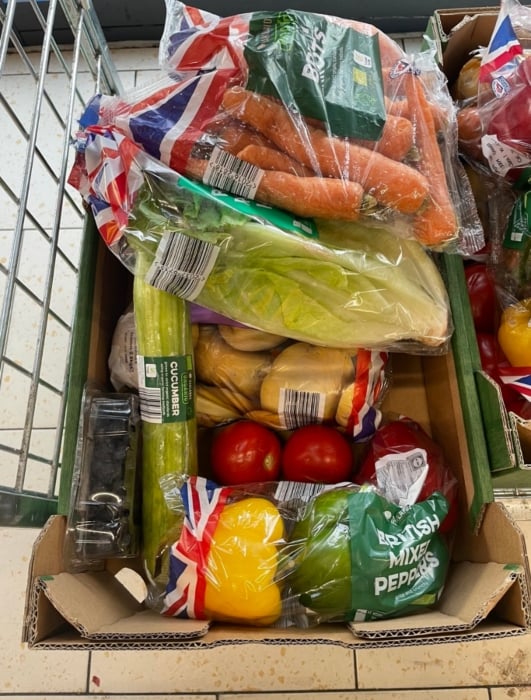
A box we spotted in Aug 2023 in a London branch of Lidl
To give you a rough idea of how much of a saving you could make, when we picked up a box to check this deal out, we got:
-
One 250g punnet of raspberries – normally £2.99
-
Two bananas – normally 37p for two (£0.78/kg)
-
Five apples – normally 89p for a five-pack (17p each)
-
13 satsumas – normally 95p for a 500g bag (£1.90/kg)
-
Two pears – normally 95p for a 550g bag (£1.72/kg)
-
One 500g pack of leeks – normally 69p for a 500g pack (£1.38/kg)
-
Two aubergines – normally 69p each
-
Three lettuce – normally 69p for a two-pack (34p for one)
-
13 potatoes – normally 91p for a 2.5kg bag (36p/kg)
-
One punnet of black grapes – normally £1.09

Based on the price of each individual item in the box, we've calculated that it would cost over £10 to buy it all separately – so buying a box for £2 really does save a bunch.
Don't have a Lidl near you? Try Sainsbury's similar fruit & veg box.
In larger stores only
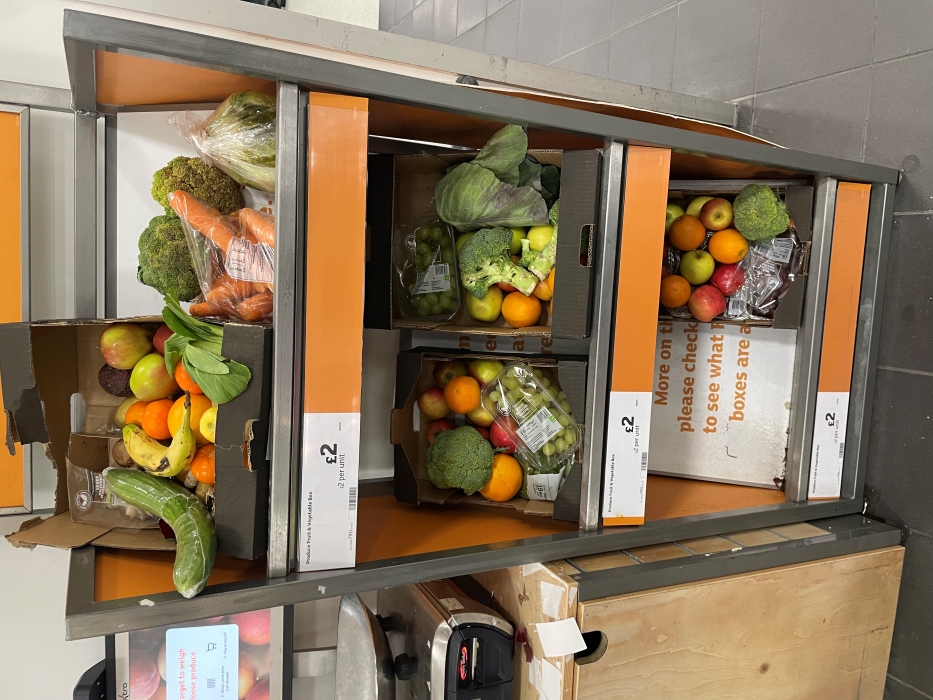
If you're visiting a larger Sainsbury's store (find your nearest), you may be able to pick up a 'Taste Me, Don’t Waste Me’ box of surplus fruit and veg for £2, while stock lasts. The boxes contain fresh fruit and vegetables that would have otherwise gone to waste.
Sainsbury's says the boxes are a permanent feature, though they will be subject to availability. Look out for them in larger stores, rather than Locals (and you can't get them online).
If boxes are available, they'll be in the fresh produce aisle. What you'll get is completely random, though Sainsbury's says typical contents could include: apples, bananas, broccoli, carrots, cauliflower, courgettes, oranges, peppers, plums, red cabbage, and swede.
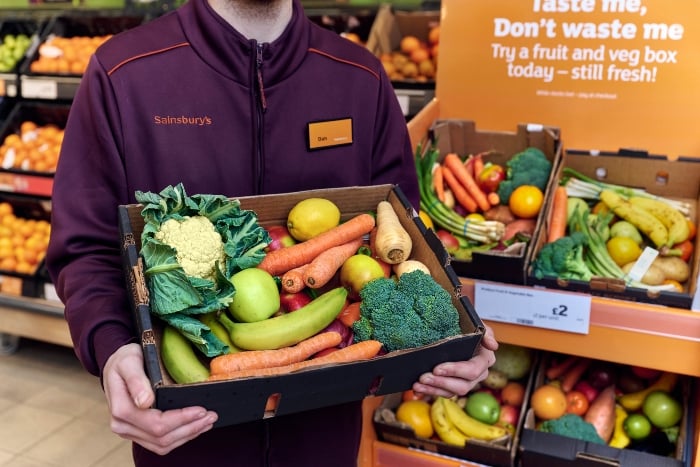
To give you a rough idea of how much of a saving you could make, we've made some calculations based on the products mentioned above:
-
One pack apples (six in pack) – normally 99p (17p each)
-
One pack Fairtrade bananas (five in a pack) – normally 78p (16p each)
-
One loose broccoli – around 72p (depending on weight)
-
One loose cauliflower – normally £1.19
-
One pack courgettes (500g) – normally £1.45
-
Loose orange – normally 30p
-
Loose red pepper – normally 69p
-
One punnet of plums (400g) – normally £1.29
-
Loose red cabbage – normally 75p
-
Loose swede – normally 62p
Based on the price of each individual item in the box, we've calculated it would cost about £9 to buy it all separately – so we reckon buying a box for £2 is a good deal.
Don't live near a Sainsbury's? Try Lidl's similar fruit & veg box.

Includes two pizzas and two sides
If you fancy a pizza, but want to save your dough, this M&S meal deal could be one for you.
Go into an M&S (find your nearest*) and you can pick up its £14 Pizza Night dine-in meal deal which includes two pizzas and two sides. M&S says this'll feed four. This is an on-going offer with no end date. A pizza would usually cost £6 by itself, so with another and two sides, we think this is good value.
What's on the menu?
The M&S website* lists 11 pizzas and 13 sides to to mix and match as you wish (subject to availability). A few highlights we spotted on the menu include:
Pizzas 🍕
-
Margherita
-
Smoked ham and cheese
-
Spicy beef
Sides 🧀
-
Mac and cheese bites
-
Onion rings
-
Mozzarella sticks
Visit our Supermarket coupons page for ways to save on the weekly shop.

For Iceland Bonus card holders. In stores only
If you're aged 60 or over, you can get 10% off your shopping at all Iceland (find your nearest*) or The Food Warehouse (find your nearest) stores nationwide, every Tuesday when you show valid ID and an Iceland Bonus card (its loyalty scheme – sign up for free* if you don't have one).
To receive the over-60s discount, simply show proof of age at the checkout – either a driving licence, senior bus pass, senior railcard, or freedom pass (although freedom passes can only be used as ID in London stores). If you’re in Scotland or Wales, you can’t get the discount on alcohol. See full T&Cs*.
Often includes potatoes, carrots, peas & more
If you go in-store or online at Morrisons, you can get selected vegetables and fruit branded 'wonky', which may be slightly irregular in shape or appearance, but totally fine to eat.
In most cases, it's the cheapest way to eat fresh at Morrisons, and means it's often priced competitively against other major supermarkets. What's available will depend on the season and stock in your local store.
Product | 'Wonky' price | 'Standard' price | Cheapest alternative |
|---|---|---|---|
Morrisons Wonky Carrots, 1.45kg | 80p | 69p (1kg) | 69p at Sainsbury's |
Morrisons Wonky Peas, 900g | £1.115 | £1.55 (for 1kg) | £1.09 at Sainsbury's |
Morrisons Wonky Pears (min four) | £1.17 | £1.55 | £1.17 at Asda |
Morrisons Wonky Potatoes, 2.5kg | £1.49 | £1.65 | £1.32 at Sainsbury's (for 2kg) & Asda |
The cheapest alternative price is based on online supermarkets – so doesn't include Aldi and Lidl. Prices may differ based on your location.
Be aware that wonky doesn't always mean cheaper. When we checked, you could get a bag of 15 apples for £2.50, but only four 'wonky' apples for £1.19.
Often includes potatoes, carrots, apples & more
If you go in-store or online at Waitrose, you can get selected vegetables and fruit branded 'wonky', which may be slightly irregular in shape or appearance, but totally fine to eat.
What's available will depend on the season and stock in your local store. Here's what we found online:
Product | 'Wonky' price | 'Standard' price |
|---|---|---|
Waitrose Wonky Carrots, 1.5kg | 70p per kg | 75p per kg |
Waitrose Wonky Potatoes, 3kg | 61.7p per kg | 90p per kg |
Waitrose Wonky Apples, six-pack | 30p each | 34p each |
Although Waitrose is rarely the most MoneySaving supermarket, if you're shopping there anyway, its wonky fruit and vegetables are a great option for healthy eating.
New-customer delivery codes
When you spend £60+ you get £15 off your 1st shop, then £12 off your 2nd, 3rd and 4th
If your household hasn't ordered from Morrisons* online before, you can get £51 off your groceries, spread across four shops, when spending £60+ each time. You’ll get £15 off your first shop, then £12 off your second, third and fourth.
To get this deal:
-
Register online at Morrisons* and opt in to marketing. If you’ve previously ordered from Morrisons Now (its fast delivery service), and not regular Morrisons, you can still get this deal.
-
Add £60 or more of eligible shopping to your basket (see below for exclusions).
-
Enter the code newhere15 at checkout by 11.59pm on Sunday 25 October.
Seven days after your first order, a second code will be emailed to you. You'll be able to use this code three times within two months of your first order and get £12 off a £60+ shop each time.
The discount codes only apply to each order as you go, so if you do all four shops, this essentially works out as £51 off £240+. You don’t have to do all four shops, so you could just use the initial £15 off £60+ code if that’s all you want.
Codes cannot be redeemed against the following: Morrisons Now orders, pharmaceuticals, tobacco, fireworks, postage, alcohol, stamps, infant milk/formula, gift coupons, gift cards, lottery online game and instant tickets, ‘top-up’ phone cards, e-top-up, digital Christmas Saver Stamps, delivery charges, and carrier bag charges.
Check out more ways to save on food & drink.
When you spend £30+ on your first three shops
If you’re new to Morrisons Now* (the supermarket's speedy delivery service), you can get £15 off your groceries, spread across three shops, when spending £30+ each time. You'll get £5 off each shop. Morrisons says this is an ongoing offer.
To get the deal, switch to 'Morrisons Now' in your online grocery account, add up to 70 items to your basket (the most it allows), then enter the code 5firstnow at checkout.
It's available from 350+ Morrisons stores (see the full list or use its postcode checker), and it says you'll typically have your groceries delivered within one hour. Delivery's £2.99.
When we checked prices, we noticed some items were slightly more expensive on Morrisons Now compared to Morrisons, so watch out for these fluctuations. Generally though, prices on both online sites were broadly the same.
Only one code can be used per household, and it can't be redeemed against certain items – see 'More info' below.
Check out more ways to save on food & drink.
More info
The code cannot be redeemed against the following items: Pharmaceuticals, tobacco, fireworks, postage, alcohol, stamps, formula milk, gift coupons and cards, lottery tickets, mobile phone top-ups, delivery charges and carrier bag charges.

Minimum £90 spend. Get a code from Health Service Discounts or Discounts for Teachers
NHS workers and teachers who are new to Ocado can get 35% off a £90 or more online grocery shop, plus a three-month smart pass, until Saturday 19 December. Get a code from Health Service Discounts or Discounts for Teachers (both are free to join).
There's a maximum discount of £33, so you'll only get the 35% off on a spend of up to £94.
The 35% off is only available on fresh produce, food cupboard, bakery, frozen, soft drinks, tea & coffee, toiletries, baby (excluding infant formula) and finger foods (we don't know what that means, either).
The minimum spend excludes delivery, tobacco products, alcohol, postage stamps, infant formula, pet food, the purchase of Ocado Gift Vouchers and food donations with Ocado.
Online code. Maximum £20 discount
If you're a new online customer to Ocado, you can get 25% off your first £60+ shop when you enter the code 25OCADO at checkout. The maximum discount is £20 (meaning you'll get the discount on up to £80 of groceries).
Delivery is free for three months with this code, subject to availability. Ocado delivers across England and Wales, but you can check if it delivers to your area by entering your postcode or town in the top right box on its website. Ocado doesn't deliver to Scotland or Northern Ireland.
The minimum spend excludes tobacco products, alcohol, postage stamps, infant formula, the purchase of Ocado Gift Vouchers, and food donations with Ocado.
NHS staff or teacher? If you're spending £90 or more, you can get 35% off your first Ocado shop.
Online code for new customers only
If you're a new online Iceland* shopper, you can get £5 off your first £45+ shop when you enter the code ICEFIVEOFF at checkout.
Iceland told us this is an ongoing deal with no end date, but we'll update here if that changes.
Plus, you can get free next day delivery when you spend over £40. No extra code is needed, you'll automatically get free delivery with this offer.

Online code for new customers. City locations in England & Wales only
If you're a new customer to online grocery delivery service Gopuff*, you can get 25% off your first six orders (no minimum spend) when you enter the code MSE25 each time at checkout. The maximum discount is £10.
Delivery is free. Gopuff delivers across city locations in England and Wales – check if it delivers to your area. It doesn't deliver within Scotland or Northern Ireland.
Alcohol and tobacco are excluded.
Check out more ways to save on food & drink.
While it is still possible to clip coupons out of a magazine or newspaper, there are now fewer of these coupons available. Like many things, couponing has largely gone digital and most of the savings you can bag these days will be via your phone or online.
There are hundreds of coupons and cashback deals out there, so the info below will help you to find them. However, we regularly update the very best in the supermarket coupons round-up above.
Here are our general tips for how to find coupons and how to max them:
Sign up to loyalty schemes for bonus offers, and some give personalised product discounts
Any true couponer will have a purse, wallet or phone full of stamp cards and loyalty cards/apps. Some give points on your normal shopping which can then be turned into vouchers, and others offer personalised coupons which are usually for items you frequently buy or it thinks you'll be interested in based on your previous purchases.
Some of the best loyalty schemes for coupons and perks:
Up to 30% off items you frequently buy at Sainsbury's. Nectar card-holders using the Sainsbury's SmartShop app can scan items as they shop in-store, and it'll automatically trigger deals of up to 30% off on selected products you regularly buy. If you don't have a smartphone, you can get the offers when you use in-store scanners, and this all on top of normal Nectar perks. However, you can't get these deals when shopping online. Check the Nectar app to see what automatic coupons you've been offered and how long they're valid for – you can use them multiple times before the expiry date. Our Nectar tips & tricks guide has more ways to earn points and boost your stash.
Turn Clubcard points into vouchers to spend at Tesco, or exchange for 2x value for days out and more. You'll get Clubcard statements quarterly, which will change your points to a voucher. You can exchange the vouchers for other rewards, or use them to take their value off your shopping online or in stores. See Reclaim & boost Clubcard vouchers for more info.
Bag Boots Advantage bonus points. Pick up a free magazine in-store monthly, and it may include coupons for money off, but most often it's additional points when you buy a product. Sometimes you'll be able to get a freebie though, so it's worth picking up. You can also get extra points by loading offers from the Boots App to your Boots Advantage card before you shop. Check out our Boots Advantage Card tips & tricks for more info.
The Pets at Home VIP card gets you coupons in the post to spend online or in-store on products your pet likes. You set up the account online, telling it which kind of pet you have, so you won't receive coupons for dog food if your furry friend is feline. These offers are often stackable, and Ex-MSE Rhiannon was previously sent a code for a free pack of cat treats for her cat's birthday, plus £3 off a £20 spend.
Check for online codes/coupons on selected products at the big supermarkets
Online shopping has become increasingly popular since the start of the coronavirus pandemic so if you're doing an online shop, have a look for codes that can get you money off, or even a freebie.
DON'T buy coupons, with the exception of purchasing a product, magazine or newspaper with the coupon inside
There are online auction sites full of photocopied high-value coupons which may have been originally obtained legitimately, but are now being sold as fakes.
You might think you're not hurting anyone by using them, but the best case scenario is you'll be turned away. Worst case scenario? You could be prosecuted for fraud.
Stack coupons with other offers for super savings – works better with physical coupons
'Stacking' is cleverly combining offers, such as a coupon and an in-store deal, to save even more. Not all retailers and coupons allow stacking, and sometimes it's a temporary glitch. The general key to this is to use a manufacturer's coupon alongside an in-store offer or coupon.
Here are some of the ways you can stack coupons to make a bigger saving:
Combine coupons with store sales. It’s all well and good using a 50p off coupon for a £2 product, but if you wait for that same product to go on sale at half-price (£1) and then use the 50p off coupon, you’re only paying 50p and essentially getting 75% off. Each of the major supermarkets have a sale on a specific item on average every two weeks. Most coupons last for a month, so if you hold out for a deal you could save a lot more.
Combine coupons with cashback. If a company is launching a new product it will sometimes offer a coupon for it and also appear in one of the cashback apps we told you about above. Providing both are for the same product, you may be able to use the coupon and get cashback as well, but it's important to check T&Cs as some apps won't always allow you to do this.
Use coupons on yellow-stickered items. The reduced section is where items which are broken, being discontinued or nearing their sell-by date are being sold at a fraction of the price. They'll probably have a sticker on them (usually yellow or orange/white) and there may be a few different reduced sections (especially for refrigerated items). If you can match a coupon to an item here, you could pocket a bargain (providing it is still edible). Check out our guide to yellow stickers.
As well as using coupons on selected products, see if you can get cashback for your WHOLE shop too
Some cashback sites and credit cards will offer cashback for a specific supermarket for a limited time, so you can get money back on any products you have a coupon or cashback for and a percentage or amount back on the total spend of your shop.
For example, when we checked, Topcashback was offering up to £7 cashback on Sainsbury's online grocery orders over £50 and up to 17% on Iceland online orders. See our Top cashback sites guides.
Some Amex cardholders have previously been able to get 10% cashback on Morrisons spends over £30 and 5% cashback at Waitrose on £20 or more spends.
Go up a brand level if your coupon makes it cheaper than your usual brand
Normally we encourage downshifting – going for a brand level lower than you usually would – in order to save money. But sometimes a higher value coupon can make a more premium brand cheaper than a basic/own-brand.
For example, if your usual basic brand soy milk is 55p a litre, but you've a coupon for £1.50 off a new premium brand that normally costs £1.70/litre then it's worth a go, as you'll only spend 20p after the coupon.
Do you need it? Will you use it? If the answer's no, don't buy it, even with a coupon
Make no mistake... companies don't offer coupons or cashback out of the goodness of their hearts. It's all part of their money-making marketing strategy, with the aim of selling more of an item, often a new product.
Of course, when you're shopping in a supermarket you're usually buying stuff you need, but nevertheless, remember the Money Mantras and don't overspend or get something you don't need just because you have a coupon.
If you think you'll use it or want to try a new version of what you already use, then it could be worth it, however, if you buy it just because you have a coupon and then don't use it, then it's not really saving you money.
Skilled couponers have a number in their head of what's a good price for products they usually buy, so any coupon which brings a new brand or new version down to less than this price dictates what they buy.
Martin's Money Mantras
Use them
If you answer 'NO' to any of the following questions, don't buy.
Are you
Will I use it?
Is it worth it?
Are you
Do I need it?
Can I afford it?
Free protection for all shopping!
And although Section 75 doesn't apply to debit cards, there is something else to fall back on if you've paid using a debit card, or used a credit card for a purchase under £100. Known as Chargeback, this is part of banks' and card companies' internal rules and not a legal requirement. Read full details of Section 75 or Chargeback, plus how to claim, in our guides.
What the * means above
If a link has an * by it, that means it is an affiliated link and therefore it helps MoneySavingExpert stay free to use, as it is tracked to us. If you go through it, it can sometimes result in a payment or benefit to the site. It's worth noting this means the third party used may be named on any credit agreements.
You shouldn’t notice any difference and the link will never negatively impact the product. Plus the editorial line (the things we write) is NEVER impacted by these links. We aim to look at all available products. If it isn't possible to get an affiliate link for the top deal, it is still included in exactly the same way, just with a non-paying link. For more details, read How this site is financed
 Latest weekly email






![[[Amazon]] deals & discount codes](https://images.ctfassets.net/x1xkqhj4w3lh/0db322ec-c734-4e17-b621-ac731f3fe396/0cbf03b85e94140db99ffd220a1d006a/Amazon-Logo.png?fm=png&h=120&q=87&fl=png8)
![[[Boots]] deals](https://images.ctfassets.net/x1xkqhj4w3lh/ade85795-f891-49b3-bc9e-5bc66b9c3a9a/7330ff79fb9a3be0464345a99241a1b4/Boots-logo-2019.png?fm=png&h=120&q=87&fl=png8)
![[[M&S]] deals](https://images.ctfassets.net/x1xkqhj4w3lh/d87b2196-0e37-4213-a72c-4447b8a5fe4c/188172ca3a30bde0b41b3cd7737b9dc5/m-and-logo-updated.png?fm=png&h=120&q=87&fl=png8)
![[[Ikea]] deals](https://images.ctfassets.net/x1xkqhj4w3lh/3PJUf7sAubWktESfO5tebM/e749dca25bea6d5d7b3d5298d0ffe942/IKEA_2018_Adobe_RGB_100.png?fm=png&h=120&q=87&fl=png8)
![[[John Lewis]] deals](https://images.ctfassets.net/x1xkqhj4w3lh/29udHXPGf2AlVzfIPXsd5v/d92370574801fd400659935116c01b60/ogFeatureImage-johnLewisPartners-040918?fm=avif&h=120&q=87)
![[[Asos]] deals](https://images.ctfassets.net/x1xkqhj4w3lh/015595df-0b31-4873-9a85-f5a39ad65ba9/3f3032603c6abf680041cd6dc05b6d0d/asos-logo-dp.jpg?fm=jpg&h=120&q=87&fl=progressive)
![[[Lidl]] deals](https://images.ctfassets.net/x1xkqhj4w3lh/fced5928-c9ca-412a-b177-f2c241f79c4b/740587d16f38de341cac0eedc2667834/lidl-logo-july-2017.jpg?fm=jpg&h=120&q=87&fl=progressive)
![[[Argos]] deals](https://images.ctfassets.net/x1xkqhj4w3lh/58517fd9-f959-4288-8bd6-8a4a7123b8f9/1beb4c28a1028cf86dc6570fa0249c68/argos-square-logo.jpg?fm=jpg&h=120&q=87&fl=progressive)
![[[eBay.co.uk]] deals](https://images.ctfassets.net/x1xkqhj4w3lh/66a67a89-c980-4957-9832-d9098b7811b4/9ead4eeafc00d026ca7f284c422f514f/ebay-logo.jpg?fm=jpg&h=120&q=87&fl=progressive)



Clever ways to calculate your finances


