Why you might not be getting your money's worth with Netflix, Disney+, or other 'Premium' 4K streaming subscriptions
Paying for a Premium-tier streaming subscription? MSE Rob explains why you might not actually be seeing (or hearing) all the advertised benefits and be better off downgrading.

With Netflix and Disney+ hiking their prices (see our news stories on Netflix price rises and Disney+ prices rises), now's a good time to assess what you really get for your subscription, especially on the pricey 'Premium' tiers. Here’s a breakdown of what those Premium-tier perks – HDR, Dolby Vision and 4K – really mean, and why there’s a good chance you’re not fully using them, even if you own a 4K TV.
Because while those Premium tiers unlock access to those fancy features, there's a good chance your TV isn't capable of delivering them properly. The same principle applies to most streaming platforms with a 4K tier – though few charge as much as Netflix at £21 a month (though now Disney+ Premium is running it close at £16).
Let’s start with the basics. The table below shows Netflix’s different tiers, what each includes, and the price increases.
Netflix plan | Netflix standard with ads | Netflix standard | Netflix premium |
|---|---|---|---|
Are adverts shown? | Yes (plus some films and TV programmes unavailable) |
|
|
Number of screens you can watch on at the same time |
|
|
|
Number of mobile phones or tablets you can download to |
|
|
|
Number of people you can share with outside your household |
|
|
|
Highest quality available | Full HD | Full HD | Ultra HD + HDR (high dynamic range) + spatial audio on select shows |
Price per month | £5.99 (increasing to £7.99) | £12.99 (increasing to £13.99) | £18.99 (increasing to £20.99) |
For full details, go to the Netflix help centre.
Other streaming services tend to have similar setups: a cheap ad-supported tier, a mid-range tier that removes ads, and a Premium tier that allows more people to watch simultaneously and adds better sound and picture quality through 4K, HDR and Dolby Atmos (which I’ll explain further down). Apart from the extra ads on the cheapest tier, the content itself is almost always the same across all tiers.
Before we get into the dissection of Premium's features and why they might not be worth your money, it's worth first acknowledging why you might want to pay for services like Netflix or Disney+ Premium: if you love the content and often have more than two people streaming at once – even in different locations – it’s the plan that fits your needs as it allows for four people watching simultaneously. It’s also now the most expensive mainstream TV and film streaming tier on the market, so of course you should weigh up the benefits vs. the increasing costs.
If, however, you pay for Premium mainly for the audio-visual boosts that you'd reasonably assume take advantage of your lovely 4K TV, then read on to see if your TV is actually capable of properly utilising the technologies that Premium unlocks.
NOTE: If you have a regular HD – or 1080p – TV, then you'll be missing out on most of the visual benefits of a Premium-tier streaming subscription.

4K: crystal-clear image quality
Let's start with the Premium perk you're most likely to be familiar with. 4K refers to screen resolutions of around 3,840 x 2,160 pixels – how many pixels fit horizontally and vertically on your screen. The ratio of those pixels to screen size (known as pixels per inch, or PPI) determines how sharp the image appears.
So if you own a 4K TV, it’s natural to think you’ll get more for your money by choosing 4K streaming tiers. But in many living rooms, you might not even notice much difference between 4K and 1080p (1,920 x 1,080 pixels), which is what standard-tier subscriptions usually offer.
How much detail you can actually see depends on how close you sit to your TV and its size. Tech experts RTINGS have explored this in depth, even creating a formula showing at what viewing distances differences between 4K (or Ultra HD) and 1080p are visible to the human eye
Here's their chart:
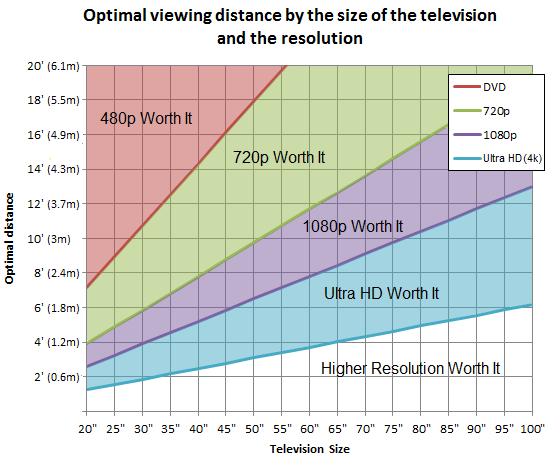
Source: RTINGS
Can’t see the details in the chart? Then your eyesight isn't good enough for a 4K TV!
Banter aside, below we’ve extracted some of that data into a table showing ideal distances for some of the more common TV sizes:
TV size | Distance where 4K detail is fully visible | Furthest distance where 4K should still look sharper than 1080p |
43in | 0.8m / 2.7ft | 1.7m / 5.6ft |
50in | 0.9m / 3.1ft | 2.0m / 6.5ft |
55in | 1.0m / 3.4ft | 2.2m / 7.2ft |
65in | 1.2m / 4.0ft | 2.6m / 8.5ft |
I don’t know about you, but seeing these figures is making me seriously rethink the TV setup in my upcoming living room refurb, because I have to sit much closer than I'd expect. Those distances also assume 20/20 vision – so if, like me, you’re a bit short-sighted and too lazy (or too short-sighted) to grab your glasses to watch TV, you’d need to sit even closer to notice the difference.
Force Netflix to show you the highest quality picture
By default, Netflix adapts the picture quality (and resolution) to your connection so that programmes keep playing without interruption. But you can change the preference for each profile, and setting it to 'High' will push Netflix to maintain a higher resolution (eg. 4K, if you have a Premium plan).
In Netflix in your web browser, click your profile icon > Account > Edit settings > Playback settings, then select 'High' under 'Data usage per screen.'
Setting it to high tells Netflix you’re happy for it to use more data for the best available quality; it will hold onto a higher-quality stream for longer, though at the cost of more buffering if your connection can't keep up.
The default 'Auto' setting prioritises smooth playback and continually chooses the best quality it thinks the connection can handle.
See our Netflix hacks guide for more tips on getting the most out of your subscription.
Only have Netflix Standard? Try this trick to get ‘free’ 4K
If you find yourself on the threshold of those ‘observable 4K’ distances above, then a nifty trick you can try instead of paying for Netflix Premium is 4K upscaling. This is a toggle-able feature that should be on most 4K TVs manufactured in the last eight years or so (as well as streaming sticks such as the Amazon Fire Stick 4K and Roku Streaming Stick 4K).
It expands a lower-resolution image up to 4K, then fills in the missing details and smooths out the image to make it approximate a native 4K image. When properly implemented, it's virtually indiscernible from actual 4K for, so you’ve nothing to lose (and a few quid each month to save) by giving it a go!
You should find this feature in your device's 'Picture' settings. Note that different brands have their own names for 4K upscaling (e.g. Samsung calls it ‘AI Upscaling’ while Philips TVs call it 'P5 AI Perfect Picture Engine').
HDR: vibrant colours and contrasts

The next visual boost you get with Premium-tier streaming subscriptions is HDR – short for ‘High Dynamic Range’. It allows compatible TVs and movies to display deeper black tones, brighter highlights and more vibrant colours.
Most 4K TVs have HDR built in, so – much like with 4K – paying for a Premium subscription can feel like a must to get the best out of it.
As with 4K, though, only certain 4K TVs have the right specs to truly take advantage of it. On older models (such as my not-long-for-this-world 2018 Philips), switching HDR on can actually make the picture look worse – grey and washed out. That’s because, while the TV technically supports HDR, its LCD panel isn’t capable of displaying it properly.
For HDR to noticeably improve your viewing experience, you ideally need an OLED TV, or at least a Mini‑LED LCD model, as these panels mix much brighter highlights with deeper, more controlled blacks. If your TV has a standard LCD panel like mine, HDR is largely wasted on it. The limited brightness and dynamic range – plus other technical factors – can literally wash out the benefits HDR should bring.
That said, try switching HDR on and off on your TV a few times, and see for yourself which looks better (HDR may need some calibrating too).
Dolby Atmos and Dolby Vision: Spatial sound and super-HDR

These are the final audio-visual perks you get when subscribing to Netflix Premium or equivalent tiers on other streaming services. Both Atmos and Vision are proprietary Dolby technologies, and your TV (or speakers/soundbar in the case of Dolby Atmos) will need to be explicitly compatible with them if you want to take advantage.
Again though – and I'm sorry to keep doing this – here come the shattered dreams, because compatibility alone isn't enough.
Dolby Vision is an advanced type of HDR that claims to offer even better colours and contrast than HDR (though even in optimal conditions, it's another one of those things that some will notice and others won't). As with HDR, an older LCD TV may technically be compatible with Dolby Vision, but its panel simply isn't good enough for the picture to look any better (and in fact, it may look worse).
Dolby Atmos, meanwhile, requires you to connect your TV to an Atmos-compatible soundbar or receiver to hear that nice spatial sound. A few TVs will officially have Dolby Atmos built into the TV speakers themselves, but you're not going to get anywhere near the sound quality you'd get from a dedicated Atmos speaker setup.
Not getting the most from Premium? You could save over £100 a year by downgrading
So now the veil's been lifted and you've realised those 'Premium' streaming tiers have been pulling the wool over your eyes (not helpful when you're trying to watch TV), it's time to look on the bright side: at least you can start saving money now.
Below is a table showing the savings you can make by downgrading from the Premium to the standard tier of the major streaming subscriptions. If your TV wasn't up to all those audio-visual bells and whistles anyway, and you're not bothered about multiple users, then you're not really losing anything – you're just saving money:
Service | Premium / top-quality tier | Downgrade to | Monthly saving | Annual saving |
Netflix | Premium £20.99 | Standard £13.99 | £7/mth | £84 |
Disney+ | Premium £15.99 | Standard £11.99 | £4/mth | £48 |
HBO Max | Premium £14.99 | Standard £9.99 | £5/mth | £60 |
Paramount+ | Premium £12.99 | Standard £9.99 | £3/mth | £36 |
NOW TV | Ultra Boost £9 add-on | Boost £6 add-on | £3/mth | £36 |
Prices accurate as of 26 October 2026.
As you can see, if you have more than one Premium-tier TV subscription on the go, you could save over £100 a year. It's worth weighing that up against the Premium-tier perks and how much you actually benefit from them (which you're hopefully better equipped to do now that you've presumably read this blog).
THE BOTTOM LINE
Again, if you genuinely benefit from the extra users and simultaneous viewers that the top tiers of Netflix, Disney+ and other streaming subscriptions offer, then do what you feel is right. But if you're in it for the purported audio-visual boosts of 4K, HDR and the Dolby gubbins, then you need to put your 4K TV under the microscope and assess whether it's actually capable of delivering these features (you also may need to sit closer to your TV).
Or just downgrade now, and see if you notice a difference. If not, then enjoy effectively the same quality of TV experience for less money. If you're looking for more cost-cutting on your telly, see our TV MoneySaving tricks and Netflix hacks.
Have thoughts on this? Want to share your own experiences or tips for 'Premium' streaming subscriptions? Head over to our blog post on this topic.
 Latest weekly email







Recent blogs
 23 October 2026