





Take control of your online subscriptions
Don't let your pounds trickle away each month

Staying on top of subscriptions can feel like fighting off attacks on all sides – some keep you distracted with retention offers and freebies, while others sneak in from behind and chip away at your finances bit by bit. Here's how to keep them under control, and stop your money joining the £1.6 billion UK consumers spend every year on unwanted subscriptions.
Know your online subscription rights
The rules pertaining to your online subscription refund rights are covered by the Consumer Contracts Regulations 2013. Here are some of the key points:
Physical goods subscriptions, such as beauty boxes or clothing, have a 14-day cooling-off period from the first delivery during which you can request a refund. You then have another 14 days to return the item. Certain perishable or hygiene-sensitive goods are excluded.
After the first delivery, refunds for future deliveries depend on the subscription’s terms, unless the item is faulty.
Digital subscriptions, such as Netflix, Spotify, or online newspapers, are different. You usually waive your right to a refund as soon as the service starts. Any refunds are then at the discretion of the service provider.
Many online subscriptions for services such as streaming, music, food boxes, and beauty products fall under continuous payment authorities (or CPAs), which operate differently from direct debits.
Changes offering greater protection to consumers are expected to come into force in 2027 under the Digital Markets, Competition and Consumers Act 2024. Read more.
Use an app to track your subscriptions
A growing number of banking apps include a section to keep track of your monthly subscriptions. Monzo, Revolut, and Halifax are some of the banks to do this, though they don't always clearly identify online subscriptions, as many are set up as CPAs (Continuous Payment Authorities) rather than direct debits.
Budget-planning apps tend to be better at this, letting you link your bank accounts then automatically identify and track your online subscription costs. The problem is that many of these apps aren't free.

Little Birdie (iOS, Android) is an exception, and we found it to be one of the best budget planners designed for UK customers. While it has a paid tier that automatically tracks your online subscriptions, the free version lets you enter your subscriptions manually (or select them from a list of known companies).
You can add in details such as whether it's a free trial, the payment due date, and when the contract ends. You can also use this to get a notification when your trial is ending.
... or use a free subscription tracker template for Excel
If you prefer to do things manually (and for free), you can create your own subscription-tracking spreadsheet, or download a free template for Excel or Google Sheets.

There are some good ones at Smartsheet – we like the 'Monthly Subscription Tracking Sheet', which lets you categorise your subscriptions. Each time you enter the cost it automatically calculates the total you've spent in the year on that subscription or category, and your total across all subscriptions.
When you download a spreadsheet from Smartsheet, remember to create a copy so you can edit it, delete that big box at the top imploring you to get the Smartsheet software, and convert all the dollar symbols to pounds.
Alternatively, you could ask ChatGPT, Claude, or other AI chatbot to create a subscription-tracking spreadsheet for you. It might take a few attempts, but this way the end result will be tailored to your specific needs.
It's always worth asking for a refund
Some digital subscriptions offer a bit more leeway on refunds, though they're not legally obliged to. For example, The Guardian offers a full refund if you cancel in the first 14 days of your subscription, while Amazon offers a full refund for Prime memberships if you haven't used any of the membership's perks (or a partial refund if you've used Prime delivery but not Prime Video, Music, Gaming or other perks).
Others, such as Netflix and Apple TV+ don't offer refunds in their policies, but if you've just realised you've been subscribed for months accidentally, and they can see you haven't used the service, contact them to explain your situation, and you may get a refund (we've seen plenty of reports of this working).
Turn off auto-renew as soon as you subscribe
If you've only signed up to a subscription for a free trial, to use a service temporarily, or for other introductory benefits, then you should always cancel right away. Otherwise you might be stung with fees like customers of Microsoft 365, Tastecard and many other subscriptions have been in the past.
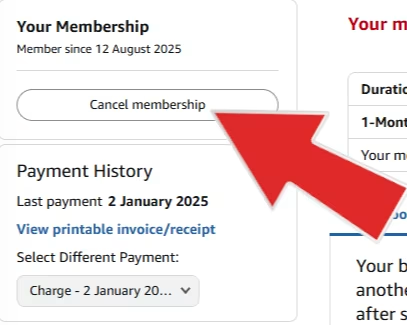
Don't put it off until tomorrow and don't get deterred by any obscure instructions on how to cancel. Get used to cancelling (or, more accurately, turning off auto-renewal for) your subscription as part of the signing-up process.
Even during a free trial period, you'll generally retain access to the content until the end of the trial or current billing period.
If you wait to cancel until just before the end of the billing cycle, it might be too late. For example, sports streaming platform DAZN has a 30-day notice period, which means that if you don't turn off auto-renew the day you subscribe, you'll already be tied into paying (pro rata, in this case) into the next billing cycle. We've seen other subscriptions require three or five-day notice periods.
The sooner you turn off auto-renew, the less likely you are to be tripped up by these.
Watch out for annual auto-renewals
Some subscriptions auto-renew you for a year when your trial period runs out (or once you've been on the subscription for a year). For example, The Independent auto-renews at £99 after your cheap trial, with no option of a refund.
Be extra-vigilant around these, because they might not be detected by your banking or subscription management app. A monthly payment is easier to recognise as a recurring payment, so don't assume your apps will pick up everything, and make sure to do your own subscription tracking as well.
If a company isn't making cancelling a subscription easy, it might be tempting to simply cancel your subscription, which falls under a CPA (continuous payment authority), via your bank.
The FCA has stated that banks must honour your request to cancel the CPA, so if your bank suggests that you should try cancelling through the company first, you can overrule them. However, while this may cancel the payments, it won't cancel any contract you have with the company, so you may still be liable for future payments (for example, if your subscription is a one-year contract, but you cancelled the CPA six months into it).
Cancelling a CPA via your bank instead of the company can be a good recourse if a company is being unresponsive to your cancellation requests, you suspect it of foul play, or you're confident that you not contractually tied in for future payments. See more on how to cancel CPAs.
Dip in and out of subscriptions
When looking at your list of subscriptions, think about which ones you genuinely use all the time (there are still ways to save on those you keep), and which you use more intermittently. For the latter, try your hand at subscription-dipping – turn off auto-renew, then after your subscription lapses, only resubscribe when you want to actually want to use it again.
If there's a specific show you want to watch on Disney+, for example, hop onto that service (ideally under a discounted or free trial), turn off auto-renew, watch your show, then hop off. See our TV MoneySaving tricks for more ways to save.
This is worth doing even if you want to keep using the subscription, because you'll save on the days, weeks, or months between renewal periods that you're not using it. This can also be a good point to ask yourself whether your subscription is really worth it.

MSE Rob likes to write about himself in the third-person, he also likes to save money by dipping in and out of PC Game Pass:
I use Game Pass on PC to play specific games from its catalogue, but then go through long phases of not using it. By turning off auto-renew, then reactivating when I actually want to use the service, I only pay for about six months staggered throughout the year, amounting to half the price I'd pay if I just let the subscription run continuously – a saving of around £90.
Get into 'cancel bluffing'
If you have a subscription that you're happy to stick with, and find dipping in and out too much hassle, then you may still be able to find ways of saving money. Haggling is one – and we've plenty of guides (and success stories) on haggling down your Sky, broadband, mobile bills and more. But there's a much easier way that should take less than a minute and doesn't involve working yourself up to hard bargaining.
Many online subscriptions shower you with retention offers with just a few clicks, if you start the cancellation process online – no phone call or haggling required. Now TV has been known to offer half-price streaming for several months, while Audible sometimes gives out free credits for getting audiobooks or reduced pricing. Other companies known to do this include Disney+, HelloFresh, DAZN, Uber One, and many digital newspapers.
So try it with whatever online subscriptions you have. Here are some of the successes reported by MSE readers:
Uber One! Went from their standard £4.99 a month to an offer of six months at £1.50! Well worth it and saved loads in the process.
New subscription rules are coming
From spring 2027, the Government is expected to bring into force new subscription rules contained within the Digital Markets, Competition and Consumers Act 2024. These are designed to make it easier for consumers to avoid subscription traps.
Key changes are expected to include:
Making subscriptions as easy to cancel as they are to sign up to – including being able to cancel online if you signed up online.
Requiring clear, prominent information before a consumer enters a subscription, such as pricing, renewal terms and cancellation rights.
Sending regular reminders about auto-renewals and upcoming subscription charges.
Starting the 14-day cooling-off period after any free or discounted trial ends, rather than at the moment you first sign up.
Many subscription services don't currently meet one or more of the above upcoming regulations. That's why until this legislation comes into play, you'll need to remain extra-vigilant.
Don't let a gift card become a grift card
If you've received a gift card or prepaid code for a subscription, always be wary of services that ask for your payment details upon subscribing, because that makes it very likely you'll automatically roll over onto a paid subscription once your prepaid period expires.
For example, you can get prepaid codes for Xbox Game Pass, but they still require you to have a Microsoft account with card details on there, so you'll need to manually turn off recurring billing to make sure you don't roll over into monthly payments.
You also need to watch out if you're using a prepaid card at a company where you're not actively subscribed, but have a card on file. On Facebook, Helen shared with us her tribulations with Playstation: "Paid on gift card so assumed would not renew. Took annual membership from card on file. Had to email CEO, awful experience!"
Take screenshots as you go
With the upcoming changes to the law, these are hopefully the dying days of the 'wild west' era of online subscriptions, but in the meantime you'll have to wade through a lot of ambiguous wording, misleading introductory offers, and confusing cancellation instructions.
Taking screenshots at key junctures as you sign up to (and cancel) a subscription means you've got a digital paper trail you can use as evidence in case of any issues.
Here are the keyboard shortcuts to instantly save whatever's on your screen to your device.
Windows: Win + Print Screen
macOS: Shift + Command + 3
Android: Power button + volume down (varies by device)
iPhone: Side button + Volume up button
While researching this guide, MSE Rob encountered an egregious introductory offer from On That Ass, which claimed you get "not one, but two free boxers". What they don't tell you until after you subscribe is that you only get your second 'free' pair with your first paid pair. He found this very misleading, and it's exactly why it's worth taking screenshots as you go.

For more ways to save online, see our cheap online shopping guide and our latest deals and discounts.
Share this guide?