





How, when, and where to find cheap Nintendo Switch and Switch 2 games
From eShop sale dates to the Switch 2 'upgrade trick' that can save up to 40% on games.

Nintendo's Switch (and now Switch 2) consoles are the only way you can play the likes of Mario, Zelda, Pikmin and Donkey Kong. But finding a bargain on Nintendo platforms isn’t always easy, so we’re here to *ahem* Link you up with the best ways to find Switch and Switch 2 games for sensible prices.
This guide covers Nintendo Switch and Switch 2 only. But don't worry, because we've got every games platform covered on MSE. To find cheap games on other gaming platforms, head over to our respective guides:
This is the first incarnation of this guide. If you have any feedback or tips, let us know in the cheap Switch games forum thread, or at gamingfeedback@moneysavingexpert.com.
Look out for the next Nintendo eShop sale
Nintendo’s sales aren’t quite as regular or rhythmic as those on other platforms. There are no regular weekly sales, instead you’re more likely to see sales themed around certain genres or publishers, such as an RPG sale or a sale to celebrate ATLUS' games catalogue.

The eShop does have seasonal sales, but the dates vary quite significantly from year to year, making it hard to pin down date ranges you should hold out for. For example, the big 2025 summer sale on the eShop came about six weeks later in 2025 than it did in 2024. Some of these sales are quite short, so you need to be quick off the mark.
2023 | 2024 | 2025 | |
|---|---|---|---|
January sale | 21 December (2022) to 3 January | 10 to 12 January | 19 December (2024) to 12 January |
Summer sale | 8 to 24 June | 10 to 23 June | 22 July to 3 August |
‘Blockbuster’ sale | N/A | 30 August to 9 September | 11 to 14 September |
Halloween sale | N/A | 25 October to 3 November | 22 October to 2 November |
Black Friday sale: | 16 November to 2 December | 18 November to 1 December | 19 November to 1 December |
Holiday sale | 14 to 31 December | 19 December to 12 January (2025) | TBC |

Overall, Nintendo doesn’t make it easy to synchronise your shopping with store sales, but our list of past major eShop sales should at least give you an idea of when to wait for.
You can also use our favourite Switch price tracker to see historical pricing, which may give you a more accurate idea of when to expect the next price drop for a specific game.
Check for bargains in the eShop's 'Under a fiver' section
One part of the eShop where you're likely to find a bargain is the ‘Under a fiver’ section.
We've also created our own 'Under a tenner' section using the eShop filters (covering games between £5 and £10).
Save big with the Switch 2 upgrade trick
If you’re the proud owner of a Nintendo Switch 2, you may have noticed a good chunk of the console’s catalogue is made up of upgraded versions of original Switch games, such as Hogwarts Legacy, Zelda: Breath of the Wild and its sequel Tears of the Kingdom.

Even though they’re the same games that came out on the original Switch years ago (with improved graphics and performance), they can cost up to £70. But you don’t have to pay that if you use this nifty trick.
If you own a Switch copy of a game that has a Switch 2 version, you can usually upgrade the game for £7 to £8. You'll then own both the Switch 1 and Switch 2 versions of the game.
Or simply play Switch 1 games on the Switch 2
Remember, you can play original Switch games on Switch 2 without paying for the upgrade. Even the games with dedicated Switch 2 versions – such as Hogwarts Legacy and Zelda: Breath of the Wild – will see performance improvements.
Some games – like Super Mario Odyssey – have even received patches that massively improve the game’s performance, instead of a new ‘Upgrade’ edition.
So it’s worth popping your Switch 1 games into your Switch 2 to see how they play without any kind of paid upgrade first.
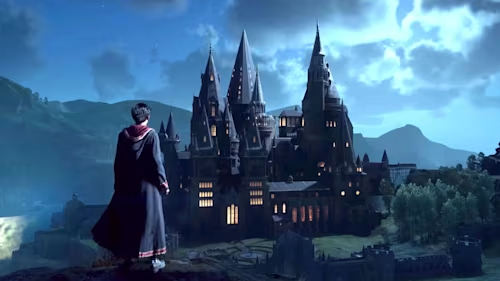
If you don't already own the Switch 1 game, picking up a copy then upgrading it can be cheaper than buying the Switch 2 version.
As an example, the cheapest we found Hogwarts Legacy for Switch 2 was around £30. However, wait for the Switch 1 version of the game to go on sale (price trackers show it regularly drops to around £10), pay £8 to upgrade it, and you'll have the Switch 2 version for a total of £18.
Similarly, at the time of writing you could grab the Switch 1 version of Zelda: Tears of the Kingdom for around £30 second-hand and upgrade for £8 – a big saving on the £67 it cost in the eShop as of October 2025.
The majority of Switch 2 games unlocked via the upgrade still require the original Switch 1 cartridge to play, so don't rush to sell or give away your old games.
There are exceptions however, such as Hogwarts Legacy. Here you don't need the original cartridge, so use the upgrade trick above, sell on the cartridge, and you'll make an even bigger saving.
Split the cost of a Nintendo Online family membership
Nintendo Switch has two subscription tiers you can sign up to - Switch Online and Switch Online + Expansion Pack. The games libraries are much smaller than you might find on Playstation or Xbox's subscription offerings, but they're considerably cheaper too, come with a few perks (such as free Switch 2 game upgrades), and are required if you want to play online multiplayer games. Here's what you get in each one:
Nintendo Switch Online | Nintendo Switch Online + Expansion Pack | |
|---|---|---|
Online gaming and features | ✅ | ✅ |
Exclusive discounts and vouchers | ✅ | ✅ |
Retro games library (NES, Game Boy, SNES) | ✅ | ✅ |
Expanded retro games library (N64, Game Boy Advance, SEGA Mega Drive, GameCube) | ✅ | |
Free Downloadable Content for select games (eg. Mario Kart 8, Animal Crossing, Splatoon 2) | ✅ | |
Free select Switch 2 upgrades (for Breath of the Wild, Tears of the Kingdom etc.) | ✅ |
You can cut the cost further with a 'family group' membership that allows up to eight people to share the subscription for £31.49/year with Nintendo Online or £59.99/year with the Expansion Pack. You're not required to live in the same household, so can be part of a 'family' with people from anywhere in the world.
Split the cost with two people, and that’s already cheaper than a regular subscription – split it with eight and you’ll only pay £7.50/year for a large retro games library, as well as upgrades to certain games.
Buy second-hand

Physical games are still hanging in there, and so is the second-hand market. There are several places in the UK to buy second-hand games:
-
eBay has a Money Back Guarantee, which means you can buy games with more security than Gumtree or Facebook Marketplace. See our eBay buying guide for how to nab the best deals.
-
CeX is the biggest chain for buying and trading in second-hand games (as well as hardware, Blu-rays, and other electronics). It offers decent prices, has reasonable returns policies, and you can sell games back to them, recouping some of the cost.
-
Independent game shops are worth supporting, and you may have one near you without even knowing it. Search online for your nearest independent game store, and see if you can grab yourself a bargain.
-
Facebook Marketplace lets you search for specific games. You can also join Facebook groups dedicated to trading second-hand games (such as UK Video Games Market and Video Games For Sale UK). Make sure you stay safe when buying and selling in person.
Rent games instead of buying them
If you’re someone who completes a game then lets it gather dust afterwards, you could save money by renting or borrowing instead. The halcyon days of renting games from Blockbuster or your local independent games shop may be over, but thanks to Boomerang Rentals, the practice continues to exist.

You can rent games for all the major consoles, going back four generations in Nintendo’s case (Wii, Wii U, Switch, Switch 2). For Switch 2 games, the cheapest package is £11.99/mth, which lets you borrow one game at a time (and an unlimited amount per month).
So instead of splashing out £70 for Zelda:Tears of the Kingdom, you could rent it and probably complete it in a month or two, costing you £12 to £24.
Boomerang Rentals has been around for a long time, and while most customers are happy with the service according to Trustpilot, there have been some complaints about games not arriving on time.
This is particularly the case for new releases, so manage your expectations.
We spoke to a Boomerang representative, who gave some tips and info on how to put yourself in prime position to get the games you want:
The longer you have an available slot on your account, the better your position to get the games you want. Aim for at least three days before a game's launch, but longer if possible.
New games are usually sent back to Boomerang about a week after release, but this can vary based on game length, popularity etc.
Add as many games to your request list as you're looking to rent, so the system can quickly allocate other games if your top choice isn't available.
It’s only £17 to rent two games at a time, so if you make the most of it you could boost your savings even further.
Borrow games (even digital ones) from friends
Loaning games among friends might feel like a outmoded schoolyard practice – like Premier League stickers and Pokémon cards. But there’s no reason not to do it in adulthood, if you have gaming friends or colleagues.

It's simple to borrow physical cartridges from friends, but Nintendo also has a system that lets you lend and borrow digital games within your Nintendo account family group via Virtual Game Cards. It’s designed to mimic how you would borrow physical games, but can be a little confusing.
Here’s what you need to know:
-
You can loan out one digitally owned game at a time, for up to 14 days. After that, the game returns to you, but you can renew the loan as many times as you like.
-
You can’t play the game yourself when you've loaned it out (similar to a physical copy).
-
You need to be on the same Wi-Fi network each time you loan or borrow a game to or from a Nintendo family member’s Switch (you don’t need to be on the same network to return games).
-
You can’t lend or borrow virtual game cards on consoles containing accounts that are members of different households/families. All accounts on all consoles need to be part of your family group.
Use a (decent) price tracker
We’ve tested several price trackers for Switch and Switch 2 games, and the results have been largely underwhelming. There isn’t a single price-tracking site that encompasses prices for both disc and digital versions of the games, and the usual suspects of UK price-tracking – Price Spy, Price Runner, Idealo – bring up results that are limited and often inaccurate.

The best games price tracker we've found that features both physical and digital games is Deku Deals, which is very good at staying up to date, and lets you set price alerts, as well as telling you when a game has matched or beaten its lowest ever price. However, it only includes prices from PlayStation Store, Amazon, GAME, and ShopTo.
Deku Deals lets you look at games in order of 'deepest discounts' (perfect if you've a few quid to spare), and 'hottest deals', which focuses on big-name games at steep discounts. You can track a game's price and get alerts for when it hits thresholds you set. It also has a chart showing the price history, so you have an idea of when to expect the next sale, and what you can expect to pay.
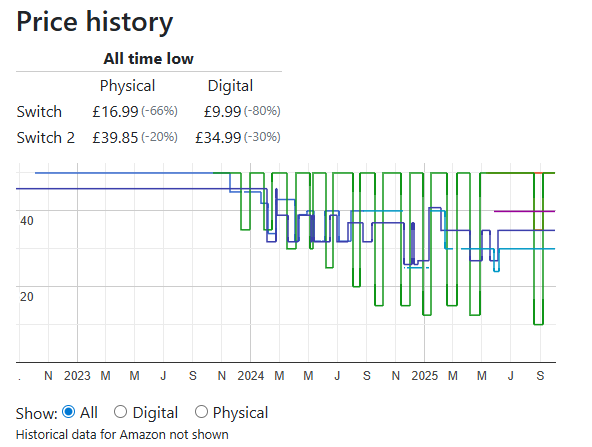
The chart above shows the price history and all-time lows for Hogwarts Legacy on both Switch and Switch 2, so you can work out if you're better off doing the Switch 2 upgrade trick or buying the Switch 2 version. By our calculations, you're much better off doing the upgrade trick when the original Switch version goes on sale.
Track prices and set alerts on HotUKDeals
HotUKDeals (HUKD) is not technically a price tracker – instead, users post deals that others upvote or downvote – the higher the ‘heat’, the better the deal. The site has a section dedicated to gaming, and you can set filters specifically for Switch and Switch 2 games. It has a far wider scope than even the best price tracker, covering both physical copies sold at most UK retailers (including Loaded.com/CD Keys) and digital games on the Nintendo eShop.
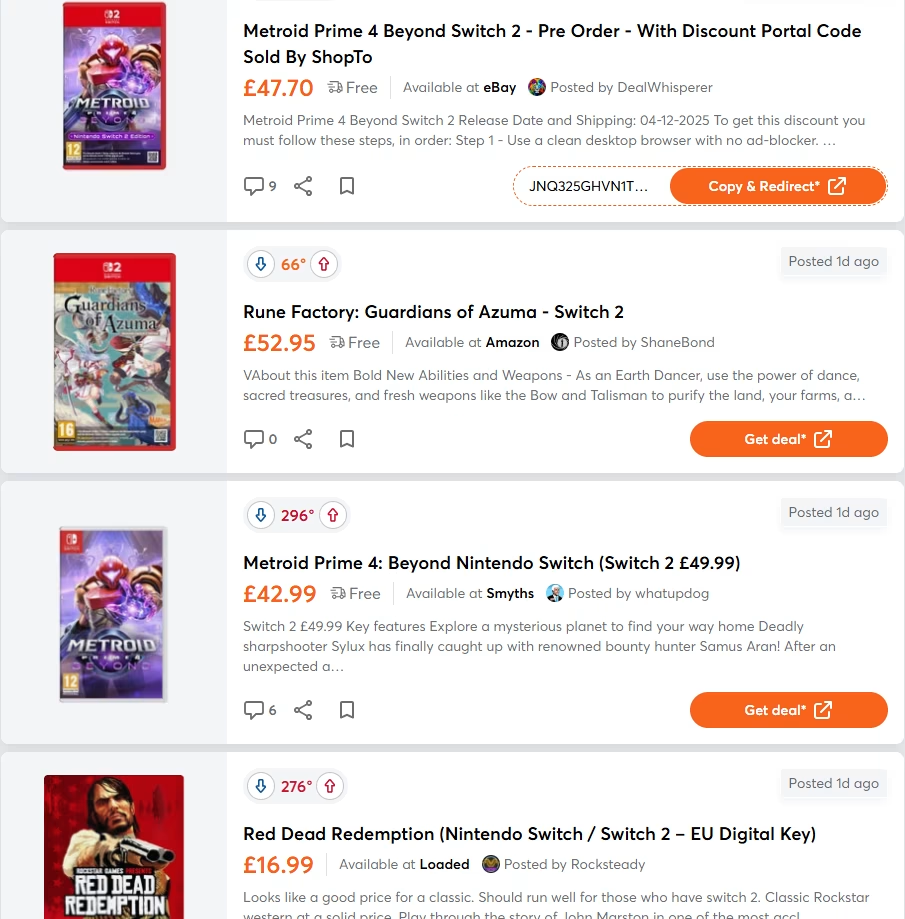
Once the heat hits a few hundred degrees, you can be pretty sure that’s an excellent price for the game in question (though you can also search for that game in the HUKD search bar to see previous user-posted deals and get an idea of how the current deal compares).
HUKD also lets you set alerts (albeit for user-voted ‘heat’ the deal generates rather than exact price thresholds). When creating an alert, call it '[game name] Switch', set the temperature threshold at which you want to be alerted (100° is a good balance between a popular deal and one that hasn’t been on the site too long, so isn’t likely to expire by the time you get round to it).
Buying from unauthorised key resellers is risky
Digital game keys allow you to buy a game from any retailer, which can then be redeemed through the Nintendo Store. Beyond the official Nintendo digital key retailers like Amazon, Argos, and Currys, you might see unofficial key seller sites include Eneba, G2A, K4G, and Kinguin popping up.
These aren't authorised sellers, and while it's not illegal to buy from them, they do carry certain risks, largely stemming from the fact that these sites mostly sell keys posted by individual users. You could end up buying a key procured by a seller through illicit means (such as a stolen credit card). If the card gets flagged as stolen, that game key can be traced back to it, and Nintendo could permanently deactivate your game without warning.
Be aware that some of these sites (G2A, Kinguin, K4G) also sell accounts to play games on. This means, instead of a key for the game, you're given the login details to an account that contains the game. Sharing accounts and account details breaks the {Nintendo User Agreement}.
If you dabble in other platforms and want to know how to grab the best gaming bargains for those, then head over to our respective guides for finding cheap Playstation 5, PC, and Xbox games.
Share this guide?